



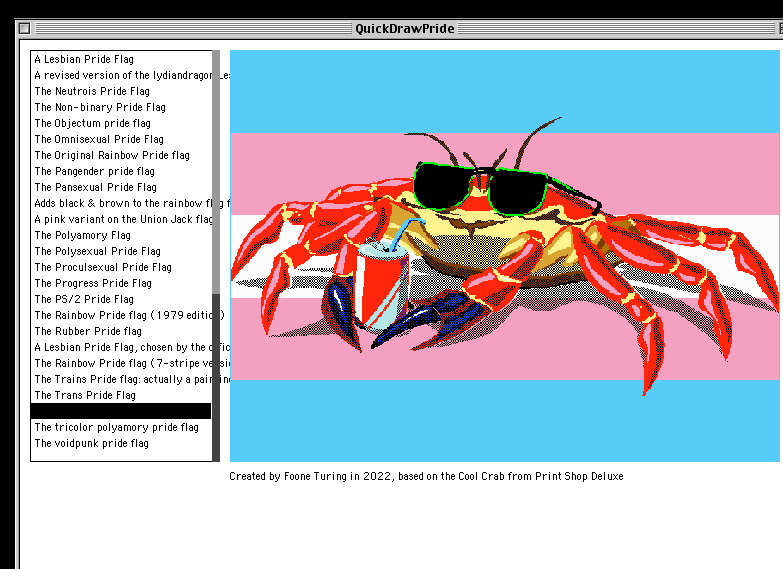
 QuickDrawPride showing the Cool Crab Trans Flag.
Here is a sequence of events that will surprise absolutely nobody who has met me. I found a program. It was for the wrong operating system, on the wrong processor, from the wrong decade. It displayed pride flags. I happen to own a small herd of twenty-five-year-old Macs. You can probably see where this is going.
The program is VGAPride by Alice Averlong: a lovely, slightly unhinged little MS-DOS application whose entire job is to draw LGBTQ+ pride flags in glorious 640×480 VGA. You type VGAPRIDE TRANS and it shows you the trans flag. That is the app. That is the whole app. I think it is wonderful.
There was only one problem: it runs on DOS, and I wanted it on classic Mac OS. So I ported it. It is called QuickDrawPride, it runs natively on PowerPC Macs running Mac OS 8.6 through 9.2.2, and this is the story of how it got there.
You want to port what, built with what?
Alice Averlong built VGAPride with Borland Turbo C++ 3.0 and Turbo Assembler 5.0, which is a very particular sort of time travel. It talks to the screen through the Borland Graphics Interface, expects a DOS-shaped world, and its original bitmap path involves x86 assembly. None of that, and I really cannot stress this enough, exists on a PowerPC Mac. Different graphics system, different processor, different everything.
On paper, this is a total rewrite.
On paper.
The flags are data, not code
The realisation that turned a frightening rewrite into a genuinely fun project was that most of VGAPride's flags are not drawing programs so much as drawing recipes. A rectangle here, a triangle there, this colour, that position. The rainbow flag is, blessedly, six coloured rectangles stacked in a row. The whole flag vocabulary is made from a small set of primitives: rectangles, triangles, quads, ellipses, polygons, stars, and lines, all laid out on a fixed 640×480 grid.
And here is the lucky bit: that grid already thinks like QuickDraw. The origin is in the top-left, x moves right, y moves down, and coordinates are plain little integers. So the job was not "redraw every pride flag by hand." It was "teach the Mac what each of these drawing commands means, then let the flag definitions come along for the ride."
Building the bridge
That bridge is the QuickDraw renderer. A VGAPride rectangle becomes PaintRect. An ellipse becomes PaintOval. A polygon becomes a QuickDraw polygon. Lines and stars get mapped across at the same 4:3 proportions. The port scales the original 640×480 coordinate space into whatever preview rectangle the Mac window has available, then asks Color QuickDraw to do the honest work.
A few DOS-isms had to be quietly shown the door. The original's world includes segmented-memory habits, VGA-era palette thinking, DOS keyboard expectations, and a command-line interface. On a PowerPC Mac with Color QuickDraw, the drawing model is much more direct: pick an RGB colour, draw the shape, move on with your life. Thousands or millions of colours are still the happy path, though 256 colours will do what classic Mac palettes do and occasionally make artistic decisions of their own.
A wee improvement: the selector
The DOS original is a command-line tool. You type a flag name, the flag appears. That is perfectly sensible for DOS, but classic Mac OS is a double-clicking, menu-bar-having, window-dragging creature. So QuickDrawPride opens into a proper Mac window: a scrolling list of flags down one side, and a live preview beside it.
Click a name, use the keyboard, or start typing the beginning of a flag name and the preview updates immediately. The designer or source credit sits underneath the flag, right where you can see it. It is quicker, it is friendlier, and, because I am constitutionally unable to leave this unsaid, it means you can actually find things. Accessibility is not a decorative garnish, a chroí.
The crab problem
Not every flag is tidy geometry. Some of VGAPride's most delightful bits are bitmap artwork, including the sunglasses-wearing Cool Crab flags. These are far too detailed to fake with rectangles unless you have infinite time and a worrying relationship with pixels.
The DOS version has its own VGA-shaped way of dealing with that. The Mac port takes a different route: the bitmap flags are regenerated from the source artwork into indexed bitmap data, then drawn through QuickDraw-compatible scanline fills. In other words, the port does not try to make a PowerPC Mac impersonate the original x86 decompression path. It keeps the artwork, changes the delivery mechanism, and lets the crab survive the journey.
The crab is important.
Building a Mac OS 9 app in 2026
I built the whole thing with Retro68, a genuinely wonderful modern toolchain that cross-compiles classic Mac software from an ordinary present-day computer. I write the code on my modern machine, CMake points at the Retro68 PowerPC toolchain, and out comes a real classic Mac application. Old-fashioned software, comfortable modern workflow.
Then I got a little carried away, as one does, and set up GitHub Actions. Every push builds the app inside the official Retro68 container, and tagged releases publish the useful classic Mac artifacts automatically. There is something deeply funny about a modern CI pipeline whose final product is a Mac OS 9 application, and I love it dearly.
The download you actually want
One last classic-Mac trap, for anyone playing along at home: old Macs store applications as more than one stream of data. Modern filesystems are very good at accidentally sanding the Mac-ness off those files. So, for a real Mac OS transfer, use the MacBinary release asset:
QuickDrawPride.binMacBinary keeps the data fork, resource fork, and APPL/QDPR type and creator metadata intact. The release workflow also publishes an HFS disk image, QuickDrawPride.dsk, which is handy for emulators and disk-image tooling. The raw application files are useful build products, but the .bin is the one I would hand to a real Mac without fuss.
Credits, with gratitude
This is a port. It stands very happily on other people's work, and it would be rotten of me not to say so plainly:
Alice Averlong made VGAPride, the flag data, and the lovingly strange original project that started all this. You can also find Alice on GitHub, Mastodon, and Bluesky. VGAPride is GPL-3.0, and so is QuickDrawPride.
Autistic Empire created the Autistic Pride Flag asset, used under Creative Commons Attribution-ShareAlike 4.0.
Jim Leonard's
lz4_8088remains credited from the original DOS build, even though the Mac port does not use that decompression path.Retro68 makes this whole modern-to-classic Mac development loop viable without needing to write the entire thing on the old hardware itself.
Faigh é / Get it
QuickDrawPride lives on GitHub, and ready-to-run builds are on the releases page. If you have a PowerPC Mac running Mac OS 8.6-9.2.2, you are all set. If you have SheepShaver, that works too.
I've also made it available on Macintosh Garden for archival and ease of direct access through the site's download system, which is particularly useful for users using older systems, such as Classilla on Mac OS 9.
Where next?
QuickDrawPride works, but a first release is really just an excuse to start making notes for the next one. A few things already on the list:
Add Distressed Egg's Queer Villain Pride flag, with the correct attribution for its CC BY-NC 4.0 licence.
Replace the drawn scrollbar hint with a real classic Mac scroll bar control.
Improve clipping and ellipsis handling for long flag names.
Refine resize-aware spacing around the preview and credit line.
Polish the About box and menu behaviour.
Add a full-screen view for the selected flag, with a quick way back to the list.
There is something I find quietly lovely about pride flags rendered on a machine from 2001, in a graphics toolbox older than that, drawn one honest shape at a time. Old hardware does not have to be a museum piece behind glass. Sometimes it just wants to fly a flag.
|
Is mise Éimí. Le bród. (I am Éimí. With pride.) |